| Unibase - Search Unibase
provides a powerful search feature that enables you to quickly find any record or group of
records based on criteria that you set. To access the search screen click the
‘Search’ button on the toolbar.
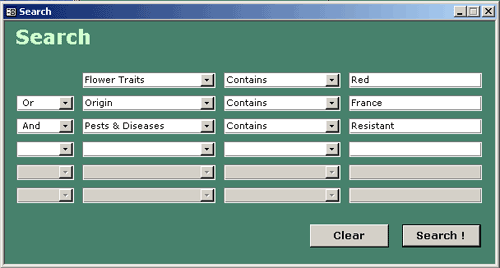
To define your search, choose the field you want to search on from the drop-down list in
the first box on the top row. Next, choose the operator you want to use for the comparison
(‘Less Than’, ‘Equal To’, etc) in the next box to the right. Finally
enter the criteria to use for the search in the rightmost box. To do a more complex search
you may continue to fill in the boxes on the search screen using ‘AND’ or
‘OR’ to determine which records are returned. Alternatively you can perform a
search and then search only the returned records by re-opening the search screen. To
execute the search click on the ‘Search’ button. You will be returned to the
main program screen and only the records meeting the search criteria will be displayed.

|
|






 sys
sys
