| Unibase�
System
Requirement, Installation and Troubleshooting
IMPORTANT NOTE:
Unibase is design to work with any Windows versions including 95, 98, 2000, NT and
XP. YOU MUST INSTALL UNIBASE ON ROOT DIRECTORY OF YOUR HARD
DRIVE e.g. drive:\unibase.
The newer version of the windows e.g. 2000 and XP
automatically prompt the user to instal the UniBase under c:\program files\unibase. You
MUST REMOVE the " \program files " and install the program under c:\unibase.
The image file name MUST
NOT BE more than 8 characters (no space between the character), e.g.
"myimage.jpg" not "my image.jpg".
Known installation
problem:
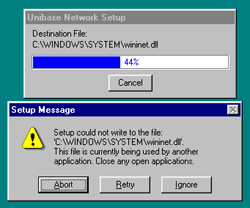
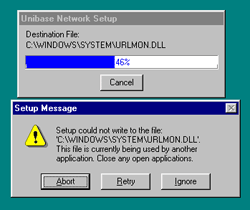
- you might receive the followings error messages
during the installation depending on the security system level, permission etc. of your
Windows setup and properties. Click on "Ignore" and continue the installation.
- UNIBASE for Windows.
 You need a 586 base computer (100Mhz) with 16 MB of RAM and 25 MB disk space
(if you install the ALL images), equipped with a graphic card and monitor capable of
producing 16bit or higher resolution graphics for proper image color and quality. You need a 586 base computer (100Mhz) with 16 MB of RAM and 25 MB disk space
(if you install the ALL images), equipped with a graphic card and monitor capable of
producing 16bit or higher resolution graphics for proper image color and quality.
- After making your choices about the drive and
directory where you want to install Unibase setup routine will copy files to your hard
disk and then the data installation program will run. You may import your data from your
present Pedigree program using the Unibase Option.
Unibase is also a tool for tracking pedigree (plant, animals) and characteristics of
plants and animals. As such its memory requirements are fairly high if you have more than
8 generation, 12mb of RAM is necessary for the Windows 98 version. These are minimums and
you will find that performance will be significantly improved by adding more RAM. If for
some reason you are missing files or the program does not appear to be functioning
correctly you can reinstall Unibase from the original disks or CD at any time. All the
files necessary to the proper functioning of the program will be reinstalled. Although data files will not be modified by the reinstallation we strongly
recommend that you do a backup of your data file before you reinstall the program. After
many additions and deletions of items your data file may become artificially large or even
corrupted in some cases. To repair and compact your data files run the file compression
utility provided with the program whenever you make significant changes to the database. Again we recommend that you do a
backup of your data files first.

|
|






 sys
sys
